

Vinyl records aren’t immune to wear and tear, especially after years of listening. The good news? You can digitise your collection and keep your favourite music safe for years to come. By converting your records into digital files, you can enjoy the sound of vinyl on the go, without having to take your turntable with you. In this guide, we’ll explore two ways to transfer your records into the digital world.
A quick note before you get started: Digitising vinyl takes a fair amount of time and effort. And even with the right equipment, a digital copy won’t necessarily capture every detail of the original analogue recording. If your main goal is to listen to music on the go, streaming services or purchased digital downloadsOpens in new tab are much more convenient options.
Digitising Vinyl with a USB Turntable
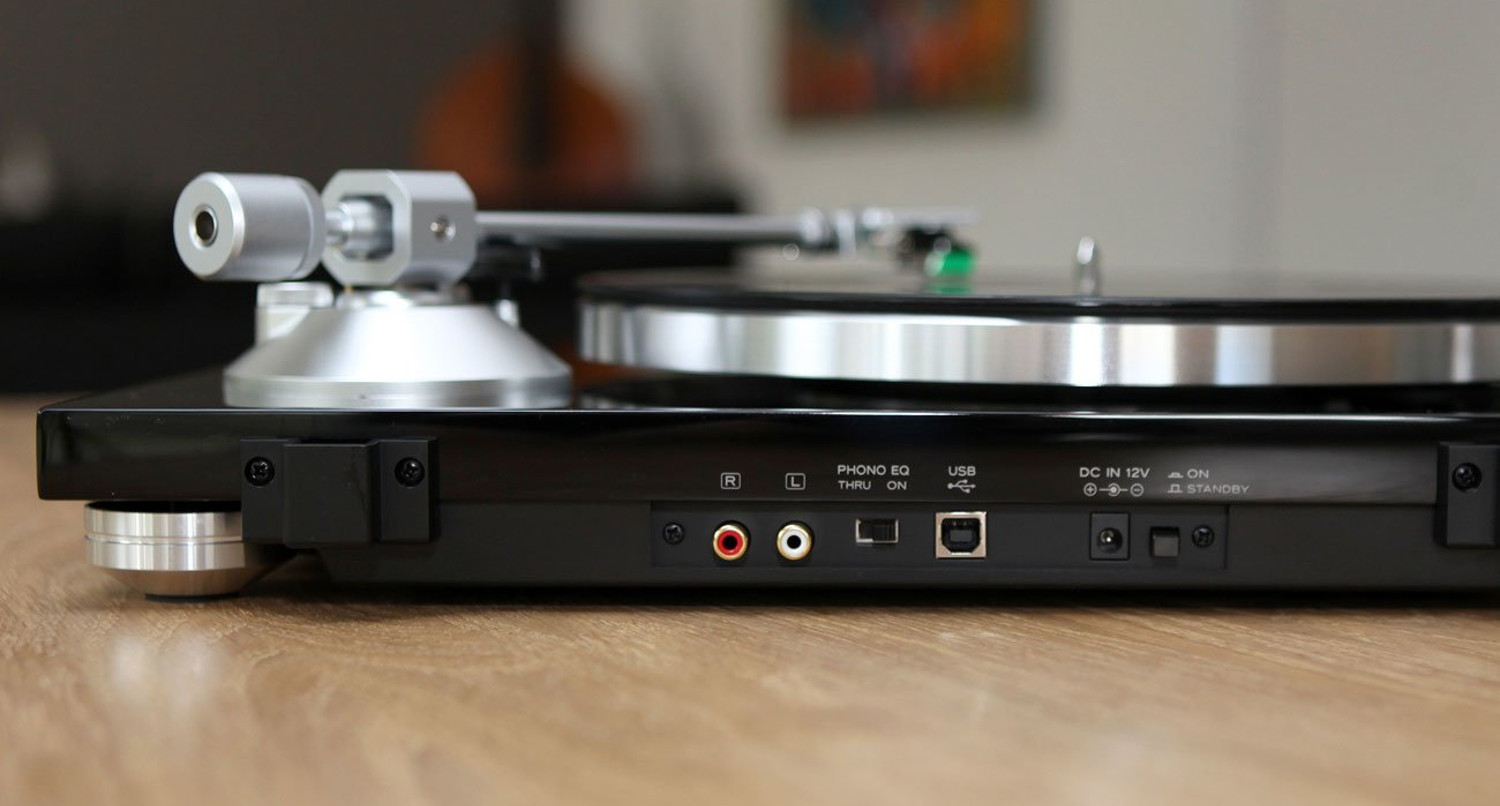
A USB turntable is the simplest way to digitise your vinyl collection. Just connect it to your computer via USB, and it should be recognised automatically. You’ll then need to play the record from start to finish to capture the audio. No additional hardware is required, provided the turntableOpens in new tab has a built-in preampOpens in new tab – which is standard for USB models.
You’ll still need audio recording software to capture the music digitally. One of the best-known options is Audacity, a free, open-source programme released under the GNU licence. Want to edit your recordings once they’ve been digitised? We’ll cover that later in this guide.
Keep in mind that the quality of your digital files will vary depending on the USB turntable you use. For good results, we recommend a bit depth of 16 bits and a sample rate of 44.1 kHz – the same specifications used for CD audio.
 Opens in new tab
Mit dem PC Schallplatten digitalisieren
You can also digitise vinyl using a conventional turntable without USB, provided it has a phono output. Depending on your set-up, you may need a separate phono preamp. Alternatively, you can use the preamp in your existing audio system and route the signal to your PC’s sound card via its line-in input. A typical set-up follows this signal chain: ➊ Turntable → ➋ Phono preamp → ➌ PC sound card (line-in).
- ➊ The turntable itself is just as important as the preamp and analogue-to-digital converter. An incorrectly aligned cartridge or a turntable that isn’t properly isolated from vibrations can compromise the recording quality. Before you start digitising, make sure to clean your records thoroughly.
- ➋ The phono preamp boosts the analogue signal from your cartridge to a level your PC can work with. If your existing system can’t do this, you’ll need an external preamp. Make sure it’s compatible with your cartridge type, whether moving magnet (MM) or moving coil (MC).
- ➌ The analogue-to-digital converters (ADCs) built into most sound cards and audio chips can limit recording quality. If you’re aiming for better results, investing in an external ADC may be worthwhile. Look for a model that supports a bit depth of at least 24 bits.
Further reading: How to connect a turntable – phono and other connection optionsOpens in new tab.
Combined units that include both a phono preamp and an analogue-to-digital converter (ADC) offer a practical way to digitise vinyl. You can then transfer the resulting digital signal to your PC via USB.
How long do vinyl records last? The grooves gradually wear down with each play, although the resulting loss in sound quality usually only becomes noticeable after around 500 plays. Incorrect turntable settings or poor record care can speed up this process considerably. For tips on keeping your favourite records in great conditionOpens in new tab, check the following video tutorials:
Stereo Speakers from Teufel
Software for Recording Digitised Vinyl Records
Alongside Audacity, which is available for Windows and macOS, there are plenty of other audio editing programmes to choose from. These include the free Traverso DAW and the paid Magix Audio Cleaning Lab. Mac users can also take advantage of GarageBand, which is free. While Audacity doesn’t offer as many features as some other audio editing tools, it has everything you need to trim your recordings and improve sound quality with a little post-processing.
As mentioned earlier, digitising vinyl won’t give you an exact replica of the original record’s sound. For vinyl enthusiasts, that may be a drawback. On the other hand, audio editing software can help improve the sound quality of your digital recordings. Tools such as Audacity may take a little time to get used to, but they’re accessible even if you have no prior experience. There are also plenty of tutorials on YouTube to help you get started.
Audio files are displayed as waveforms, making it easy to spot transitions between tracks and select specific sections for editing. Clicks and background noiseOpens in new tab can also be removed with just a few clicks. The software can automatically detect these unwanted noises.
The following video covers the basic settings for digitising vinyl records:
One final tip: You can also pay a professional service to digitise your vinyl records. While this saves you time and effort, the costs can be quite high. Before going down this route, check whether a digital version of the same recording is available to buy for less. It could save you both money and the hassle of digitising your vinyl collection yourself.
No Need to Choose: Enjoy Vinyl and Digital with Teufel
 Opens in new tab
▶ THEATER 500 KOMBO 2 VINYL 250Opens in new tab: Connect your stereo system to the KOMBO 62 receiver, put on your favourite record and immerse yourself in outstanding sound. With their 3-way design, the THEATER 500 floorstanding speakers deliver an impressive listening experience, from deep, powerful bass to crystal-clear highs.
▶ ULTIMA 40 KOMBO 3 + Dual DT 250Opens in new tab: Bring authentic hi-fi sound into your living room with this complete stereo system, whether you’re listening to vinyl, CDs or digital music. The set pairs our iconic ULTIMA 40 floorstanding speakers with a powerful CD receiver and a high-quality turntable, so you can enjoy all your favourite tracks in outstanding sound quality.
▶ DUAL DT 400 USBOpens in new tab: The DUAL DT 400 is a high-quality turntableOpens in new tab that offers plenty of flexibility thanks to its built-in phono preamp and USB connection. Other highlights include belt drive, an Audio-Technica moving-magnet cartridge and a sturdy aluminium platter. It’s also compatible with all Teufel complete stereo systems.
More Products from the Teufel Shop
Conclusion: How to Digitise Vinyl Records
- Digitising your vinyl collection helps preserve your favourite records and lets you take your favourite tracks with you wherever you go.
- A USB turntable with a built-in phono preamp lets you digitise records without any additional hardware.
- If you have a conventional turntable without USB, you can connect it to your PC using an external phono preamp.
- Both methods require a PC with audio recording and editing software installed, such as the free programme Audacity.

Leave a Reply