


The High Definition Multimedia Interface – better known by the abbreviation HDMI – has become indispensable in the home cinema world today. Not only among cinephiles was the excitement great when it was introduced in 2003. HDMI makes home cabling of playback devices easier and delivers better picture and sound quality. In addition, HDMI offers several extra functions hidden behind the terms “HDMI ARC”, “HDMI eARC” and “HDMI CEC”.
What is HDMI?
HDMI (High-Definition Multimedia Interface) is a widely used standard for transmitting high-resolution audio and video signals via a single cable. It was developed to improve quality and ease of use in consumer electronics by enabling a digital connection between devices such as televisions, Blu-rayOpens in new tab players, game consoles, computers and home cinema systems. HDMI supports both uncompressed video formats such as 1080p, 4K (or Ultra HD, which practically means the same thing) and 8K, as well as advanced audio formats such as Dolby Atmos and DTS.
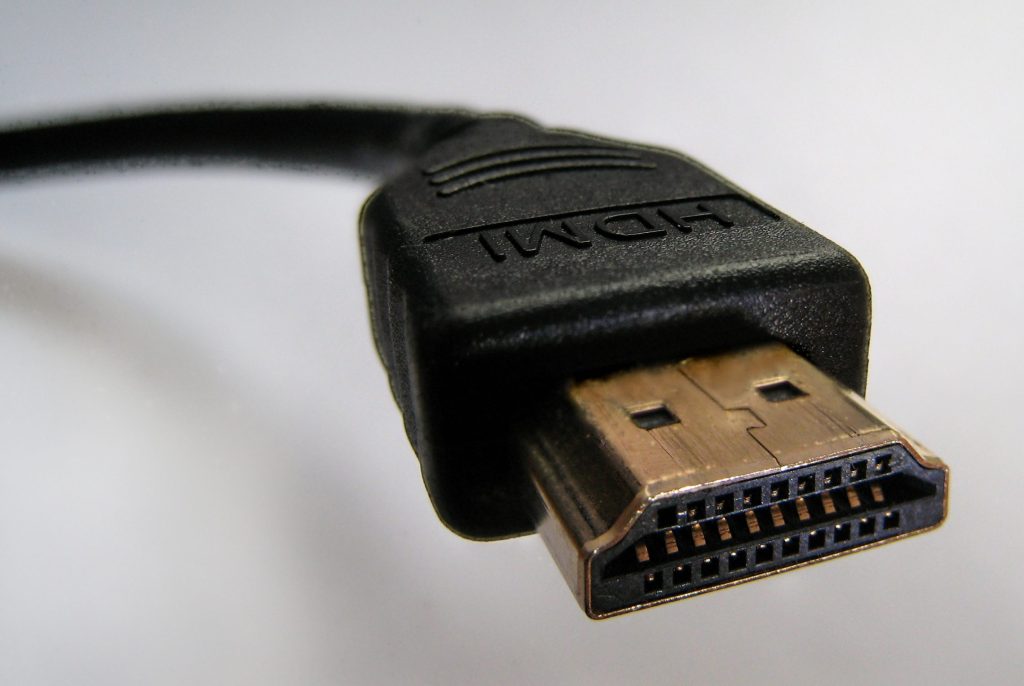
All details on the HDMI versions
Since the introduction of HDMI 1.0 in 2002, the technology has continuously evolved. Each new version brought significant improvements in terms of resolution, bandwidth and additional features. You can see how HDMI has changed over time in the following table.
| Version | Year of publication | Max. data rate | New video formats | New audio formats |
|---|---|---|---|---|
| HDMI 1.0 | 2002 | 3,96 Gbit/s (165 MHz x 8 bit x 3) | 1920 x 1080p; 60 Hz | DTS, Dolby Digital, 8-Kanal-PCM, MPEG |
| HDMI 1.1 | 2004 | Typ A: 3,96 Gbit/s(165 MHz x 8 bit x 3) Typ B: 7,92 Gbit/s(165 MHz x 8 bit x 6) | 1920 x 1080p; 60 Hz | DVD-Audio |
| HDMI 1.2 | 2005 | Typ A: 3,96 Gbit/s(165 MHz x 8 bit x 3) Typ B: 7,92 Gbit/s(165 MHz x 8 bit x 6) | 1920 x 1080p; 60 Hz | SACD |
| HDMI 1.2a | 2005 | Typ A: 3,96 Gbit/s(165 MHz x 8 bit x 3) Typ B: 7,92 Gbit/s(165 MHz x 8 bit x 6) | 1920 x 1080p; 60 Hz | SACD |
| HDMI 1.3 | 2006 | 8,16 Gbit/s (340 MHz x 8 bit x 3) | 2560 x 1440p; 60 Hz | dts-HD, TrueHD |
| HDMI 1.3a/b/c | 2006 | 8,16 Gbit/s (340 MHz x 8 bit x 3) | 2560 x 1440p; 60 Hz | dts-HD, Dolby Digital Plus, TrueHD |
| HDMI 1.4 | 2009 | 8,16 Gbit/s (340 MHz x 8 bit x 3) | 3840 x 2160p; 24 Hz 1920 x 1080p; 24 Hz (3D) | dts-HD, Dolby Digital Plus, TrueHD |
| HDMI 1.4a | 2010 | 8,16 Gbit/s (340 MHz x 8 bit x 3) | 3840 x 2160p; 24 Hz 1920 x 1080p; 24 Hz (3D) | dts-HD, Dolby Digital Plus, TrueHD |
| HDMI 1.4b | 2011 | 8,16 Gbit/s (340 MHz x 8 bit x 3) | 4096 x 2160p; 24 Hz 3840 x 2160p; 30 Hz 2560 x 1600p; 60 Hz 1920 x 1080p; 120 Hz | High-bitrate audio (HBR), sampling rate × number of channels: max. 384/768 kHz, 1-bit audio |
| HDMI 2.0 | 2013 | 14,4 Gbit/s (600 MHz x 8 bit x 3) | 3840 x 2160p; 60 Hz 1920 x 1080p; 48 Hz | 32-channel audio, sampling rate × number of channels: max. 1536 kHz |
| HDMI 2.0a | 2015 | 14,4 Gbit/s (600 MHz x 8 bit x 3) | 3840 x 2160p; 60 Hz 1920 x 1080p; 48 Hz | 32-channel audio, sampling rate × number of channels: max. 1536 kHz |
| HDMI 2.0b | 2016 | 14,4 Gbit/s (600 MHz x 8 bit x 3) | 3840 x 2160p; 60 Hz 1920 x 1080p; 48 Hz | 32-channel audio, sampling rate × number of channels: max. 1536 kHz |
| HDMI 2.1 | 2017 | 24 Bgps/FRL6x4-Mode: 21⅓ GBit/s (333⅓ MHz × 16 bit × 4) 48 Gbps/FRL12x4-Mode: 42⅔ GBit/s (666⅔ MHz × 16 bit × 4) | 7680 × 4320p; 60 Hz 3840 × 2160p; 120 Hz (3D) | |
| HDMI 2.1a | 2022 | 24 Bgps/FRL6x4-Mode: 21⅓ GBit/s (333⅓ MHz × 16 bit × 4) 48 Gbps/FRL12x4-Mode: 42⅔ GBit/s (666⅔ MHz × 16 bit × 4) | 7680 × 4320p; 60 Hz 3840 × 2160p; 120 Hz (3D) | |
| HDMI 2.1b | 2023 | |||
| HDMI 2.2 | 2025 |
HDMI 2.0: The big leap in HDMI technology
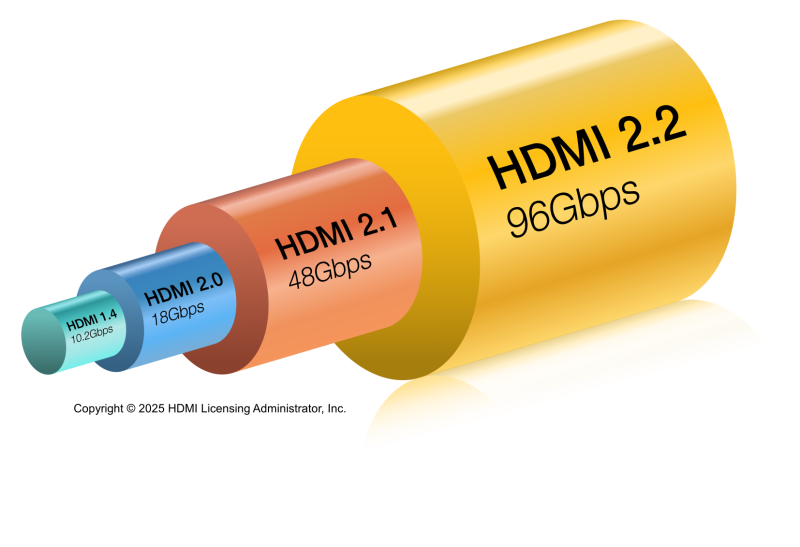
HDMI 2.0 marked a significant advance in HDMI technology and set new standards for the transmission of audio and video data. Compared to its predecessor versions, HDMI 2.0 increased the bandwidth to 18 Gbit/s, enabling support for 4K video at 60 Hz and thus delivering smoother and more detailed picture quality. This version also introduced extended support for up to 32 audio channels and a higher sampling rate of up to 1,536 kHz, resulting in noticeably improved audio quality.
In addition, HDMI 2.0 enabled the simultaneous transmission of two video streams on one screen, a plus for fans of multi-view applications. The introduction of static HDR (High Dynamic Range) and expanded color space support also significantly improved brightness, contrast and color reproduction.
Matching products from the Teufel shop



HDMI 2.1: Introduction of eARC
In 2017, the HDMI 2.1 standard was introduced. This version brought various improvements, including a significantly higher transmission rate of 48 Gbit/s and support for Dynamic HDR. There was also a decisive innovation in audio transmission: the Enhanced Audio Return Channel (eARC). You can find out more about this below.
HDMI 2.0 vs. HDMI 2.1: The most important differences at a glance
HDMI has revolutionized the transmission of audio and video signals and has continued to evolve steadily. While HDMI 2.0 is a proven standard sufficient for most applications, HDMI 2.1 offers future-proof improvements for modern home cinema and gaming setups. Whether an upgrade makes sense depends on individual requirements – especially if 8K or advanced gaming features play a role. The following table shows the most important differences at a glance:
| Function | HDMI 2.0 | HDMI 2.1 |
|---|---|---|
| Bandwidth | 18 Gbit/s | 48 Gbit/s |
| Maximum resolution | 4K (60 Hz) | 8K (60 Hz); 4K (120 Hz) |
| Audio Return Channel (ARC) | Yes | Enhanced Audio Return Channel (eARC) |
| HDR support | Static HDR (HDR 10) | Dynamic HDR (HDR 10+) |
| Audio channels | Up to 32 channels | Up to 32 channels, uncompressed audio |
| Variable Refresh Rate (VRR) | No | Yes |
| Auto Low Latency Mode (ALLM) | No | Yes |
| Quick Frame Transport (QFT) | No | Yes |
| Quick Media Switsching (QMS) | No | Yes |
| Color depth and subsampling | 4:4:4 color subsampling | 4:4:4 color subsampling |
| Maximum sampling rate | Up to 1,536 kHz | Up to 1,536 kHz |
| Dual-Video-Streams | Yes | Yes |
| Aspect ratio | 21:9 | 21:9 |
| Ethernet channel | Yes | Yes |
HDMI 2.2: The latest transmission standard
In January 2025, HDMI 2.2 was announced at CES in Las Vegas. The new version once again promises significant technological advances building on previous developments. It doubles the available bandwidth to an impressive 96 Gbit/s, enabling resolutions of up to 16K. The refresh rate increases to 480 frames per second at 4K and 240 frames per second at 8K. In addition, the Latency Indication Protocol (LIP) is designed to synchronize picture and sound even better.
HDMI ARC
The Audio Return Channel, or ARC for short, simplifies the HDMI connection of a home cinema system to the television. It has been supported since HDMI version 1.4 and by almost every commercially available television. Thanks to HDMI ARC, a device can both receive audio signals from a source and send them back again via the same cable. This eliminates the need for a separate optical audio cable.
HDMI ARC runs via the receiver, the central interface in the home cinema. As the graphic below shows, the television receives picture and sound via antenna or cable and forwards the signals via HDMI to the AV receiver or amplifier. This then sends the audio signals to the speakers. Thanks to HDMI ARC, signal transmission also works from the Blu-ray player via the receiver to the speakers and the television.

HDMI eARC
With the leap to HDMI 2.1, ARC was further developed into eARC (Enhanced Audio Return Channel). This allows for a significantly higher bandwidth and speed in data transmission. Audio and picture quality therefore benefit additionally from eARC, as almost nothing has to be compressed anymore. This is particularly interesting if you use Dolby Atmos or DTS:X and want the sound to actually reach the speakers in high quality.
Since compression of the audio signal is no longer necessary with HDMI eARC, significantly more channels – theoretically up to 32 – can be addressed losslessly. 5.1 and 7.1 systems can therefore be driven without any problems using an uncompressed signal – a key difference compared to HDMI ARC. The maximum audio bandwidth with eARC is 37 Mbit/s (with ARC it is only 1 Mbit/s), with a resolution of 24 bit and a sampling rate of 192 kHz. This also creates optimal conditions for transmitting object-based audio formats that enable 3D sound. By the way, via eARC the receiver tells the TV which sound formats it supports – the television then automatically outputs the best possible signal.
Important to know: You can use the functions of HDMI ARC with any HDMI cable. For HDMI eARC, however, a modern cable is required. High-Speed or Ultra High-Speed HDMI cables generally support this technology. In addition, the connected devices must have the necessary eARC or HDMI 2.1 compatibility. In some cases, HDMI 2.0 is sufficient, for example if the manufacturer of your television has already updated the device for eARC via a firmware update.

HDMI CEC (Consumer Electronics Control)
HDMI CEC – short for Consumer Electronics Control – is about cross-device control of all consumer electronics typically found in a modern living room. Ideally, you can connect all devices such as televisions, TV receivers, AV receivers, Blu-ray players, game consoles and of course the sound system via HDMI and then control them together using CEC.
However, many manufacturers have introduced their own names for the same system, which makes finding the function more difficult. You can find the most important terms in the following table:
| Provider | Name for CEC function |
|---|---|
| Teufel | CEC |
| Philips | EasyLink |
| LG | Simplink |
| Samsung | Anynet+ |
| Sony | BRAVIA Sync |
| Panasonic | VIERA Link |
| Thomson | T-Link |
| Pioneer | Kuro Link |
| Grundig | Digi Link |
| Hisense | CEC |
HDMI CEC in practice
With the help of HDMI CEC, central control of a home cinema system is possible. The prerequisite is that all devices – such as the television, AV receiver and Blu-ray player – are connected via HDMI and are CEC-compatible. When one device is started, the other devices switch on automatically and select the appropriate channel.
In practice, however, problems can occur because manufacturers implement the standards differently and the HDMI handshake, i.e. the exchange of control information between devices, does not always work reliably. If the automatic control does not work as desired or individual devices react unexpectedly, CEC can be deactivated in the settings.
Practical use cases for your use of HDMI
HDMI is used in many areas and ensures optimal transmission of picture and sound. It plays a decisive role especially in these use cases:
- Home cinema setups: HDMI enables the transmission of high-resolution video and advanced audio formats.
- Gaming:With HDMI 2.1, gamers can benefit from features such as Variable Refresh Rate (VRR) and Auto Low Latency Mode (ALLM).
- Video conferencing and presentations: HDMI enables reliable transmission of image and sound signals in high quality.
- Smart home integration: With HDMI CEC, multiple devices can be controlled via a single remote, simplifying operation and integration of smart home components.
Connect everything via HDMI: AV receiver as the interface
 Opens in new tab
▶ System 6 THX + Denon X3800H for Dolby Atmos “5.2.4 set”Opens in new tab : For a large home cinema, we recommend this 5.2.4 complete system including the Denon AV receiver AVC-X3800H, System 6 THX and Dolby Atmos height speakers Reflekt for a top-class home cinema experience. Enjoy cinema sound with high speech intelligibility for music, movie soundtracks & games. Suitable for almost all home cinema complete systems from TeufelOpens in new tab.
Sets with AV receiver in the Teufel shop

ULTIMA 20
199,99 €
ULTIMA 40 ACTIVE 3 Club Edition
1099,99 €
DEFINION 3S + DENON DRA-900H
1399,99 €FAQ: Frequently asked questions about HDMI ARC, eARC & CEC
Look for the label “ARC” on the connected devices. Both the TV and the receiver—and of course the HDMI cable itself—must support Audio Return Channel for the transmission to work. New cables are usually ARC‑enabled.
You may need to manually enable ARC on both the TV and the receiver. Check the audio output settings for this. In most cases, the CEC function also has to be activated for ARC to work.
Since ARC replaces the audio cable, it supports all audio formats that would normally be sent via that cable. These include Dolby Digital, DTS, or PCM audio (5.1 or 7.1). HD and 3D formats like Dolby Atmos, Dolby TrueHD, or DTS‑HD Master Audio are not transmitted. For that, the newer eARC standard is required.
To use eARC, you need an HDMI High Speed or Ultra High Speed cable. That means you don’t have to buy a new cable if you already have a High Speed cable (important: with Ethernet). eARC also works with HDMI 2.0 cables.
In general, all devices with HDMI 2.1 ports are eARC‑compatible. The range of compatible TVs, receivers, and soundbars is growing. Older devices with HDMI 2.0 can be made eARC‑capable.
Yes. As soon as one of the devices connected via HDMI only supports ARC, the audio signal is compressed and 3D sound is not possible.
That depends on the specific specification, meaning the HDMI version. For the current HDMI 2.1 standard (which also supports eARC), you need an Ultra High Speed HDMI cable. In the Teufel shop, you’ll find a selection of different HDMI cables in the speaker cableOpens in new tab category. Good to know: with a 2.1 cable, you can also use 2.0 versions.
Use an optical audio cable (TOSLINK) or an AUX cable instead. If the devices have analog connections, a RCA cable also works. You can learn more about the different types in our audio cable overview. We also explain how to connect your TV and sound system via a receiver.
Reading tip: Find out more about Lisa and the Teufel tutorials.
Conclusion: HDMI as an indispensable standard for modern audio and video transmission
HDMI has established itself as an indispensable standard for the transmission of high-resolution audio and video signals and offers numerous advantages over older analog technologies. With the introduction of HDMI 2.0, a major leap forward was achieved, bringing higher bandwidths, support for 4K at 60 Hz and improved audio and video features. HDMI 2.1 continued this progress and delivered revolutionary improvements such as a bandwidth of 48 Gbit/s, support for 8K and dynamic HDR, as well as advanced gaming features like VRR and ALLM.
For home cinemas, HDMI offers decisive advantages: it enables razor-sharp picture quality, lossless sound and easy setup. Features such as HDMI CEC simplify control by coordinating multiple devices via a single remote, while eARC ensures optimal audio transmission.
Whether for movies, gaming or music – HDMI ensures seamless and high-quality multimedia transmission. Thanks to continuous development, this technology remains the first choice for home cinema enthusiasts and demanding audio and video applications.
Audioblog
The podcast has been automatically generated by AI, but the content comes directly from an article written by our own editorial team. This ensures the quality remains high and allows you to hear our story in a new format.
- Image 1: ©D-Kuru (Own work), Some rights reservedOpens in new tab, Source: Wikimedia CommonsOpens in new tab
- Image 2: ©HDMI Licensing Administrator, Inc., Source: HDMI Press ResourcesOpens in new tab
- Image 3: ©DoubleT091 (Own work), Some rights reservedOpens in new tab, Source: Wikimedia CommonsOpens in new tab
- Image 4: ©Pittigrilli (Own work), Some rights reservedOpens in new tab, Source: Wikimedia CommonsOpens in new tab




Leave a Reply